> ## Documentation Index
> Fetch the complete documentation index at: https://docs.insighthread.com/llms.txt
> Use this file to discover all available pages before exploring further.
# Filter View
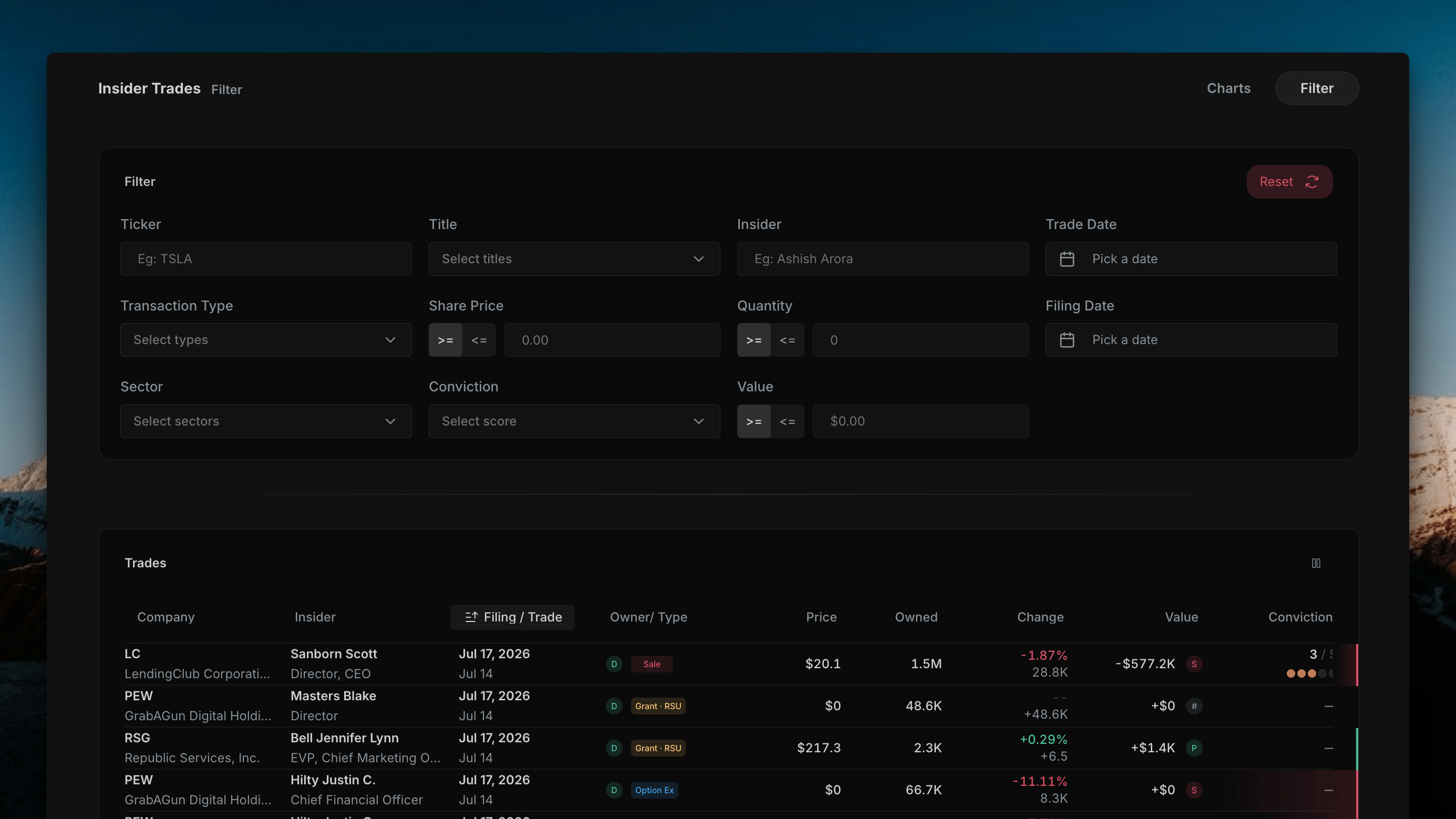
The Insider Trades page has two view modes, switchable from the top-right corner: **Charts** (see [Chart View](/insider-trades/chart-view)) and **Filter** — a single table of every insider transaction, with a full filter panel above it. This page covers the Filter view.
 ***
## Filter Panel
The filter panel sits above the table and narrows the transaction list down to exactly what you're looking for. A **Reset** button in the top-right clears every filter back to default.
| Filter | Type | Description |
| -------------------- | --------------------------- | -------------------------------------------------------------------------------------------------------- |
| **Ticker** | Text | Free-text ticker search (e.g. "TSLA") |
| **Title** | Dropdown | Filter by insider title/role (e.g. CEO, CFO, Director) |
| **Insider** | Text | Free-text search by insider name (e.g. "Ashish Arora") |
| **Trade Date** | Date picker | Filter by the date the transaction was executed |
| **Transaction Type** | Dropdown | Filter by transaction type (e.g. Sale, Purchase, Grant, Option Exercise) |
| **Share Price** | `>=` / `<=` toggle + number | Filter transactions above or below a given share price |
| **Quantity** | `>=` / `<=` toggle + number | Filter by number of shares transacted |
| **Filing Date** | Date picker | Filter by the date the Form 4 was filed with the SEC |
| **Sector** | Dropdown | Filter by GICS sector |
| **Conviction** | Dropdown | Filter by Conviction Score range — see [Conviction Scoring](/features/insider-trades#conviction-scoring) |
| **Value** | `>=` / `<=` toggle + number | Filter by total dollar value of the transaction |
Each `>=` / `<=` field lets you set either a floor or a ceiling on that value — e.g. only trades with a Share Price `>=` \$50, or only trades with a Value `<=` \$100K.
***
## Trades Table
Below the filter panel, every transaction matching the current filters is listed in a single table:
| Column | Description |
| ---------------- | ----------------------------------------------------------------------------------------------------------- |
| **Company** | Ticker and company name |
| **Insider** | Name of the reporting person |
| **Filing/Trade** | Filing date and trade date (sortable — the default sort) |
| **Owner/Type** | Insider role badge (D = Director, etc.) plus the transaction type badge (e.g. Sale, Grant · RSU, Option Ex) |
| **Price** | Share price at execution |
| **Owned** | Total shares owned after the transaction |
| **Change** | Percent and share change in position |
| **Value** | Total dollar value of the transaction |
| **Conviction** | Conviction Score, shown as a filled-dot meter where applicable |
A column-visibility icon in the top-right of the table lets you hide any columns you don't need — the same control used on the [Chart View](/insider-trades/chart-view)'s Cluster Table.
Non-discretionary transactions — grants, RSUs, and option exercises — typically show a Conviction Score of — since they don't reflect an active buy or sell decision by the insider.
## Related topics
- [Chart View](/insider-trades/chart-view.md)
- [Detail Views](/home/detail-views.md)
- [Presentations Filter](/home/presentations-filter.md)
- [Transcript Filter](/home/transcript-filter.md)
- [Insighthread News Feed: Real-Time SEC Filing Events](/features/news-feed.md)
***
## Filter Panel
The filter panel sits above the table and narrows the transaction list down to exactly what you're looking for. A **Reset** button in the top-right clears every filter back to default.
| Filter | Type | Description |
| -------------------- | --------------------------- | -------------------------------------------------------------------------------------------------------- |
| **Ticker** | Text | Free-text ticker search (e.g. "TSLA") |
| **Title** | Dropdown | Filter by insider title/role (e.g. CEO, CFO, Director) |
| **Insider** | Text | Free-text search by insider name (e.g. "Ashish Arora") |
| **Trade Date** | Date picker | Filter by the date the transaction was executed |
| **Transaction Type** | Dropdown | Filter by transaction type (e.g. Sale, Purchase, Grant, Option Exercise) |
| **Share Price** | `>=` / `<=` toggle + number | Filter transactions above or below a given share price |
| **Quantity** | `>=` / `<=` toggle + number | Filter by number of shares transacted |
| **Filing Date** | Date picker | Filter by the date the Form 4 was filed with the SEC |
| **Sector** | Dropdown | Filter by GICS sector |
| **Conviction** | Dropdown | Filter by Conviction Score range — see [Conviction Scoring](/features/insider-trades#conviction-scoring) |
| **Value** | `>=` / `<=` toggle + number | Filter by total dollar value of the transaction |
Each `>=` / `<=` field lets you set either a floor or a ceiling on that value — e.g. only trades with a Share Price `>=` \$50, or only trades with a Value `<=` \$100K.
***
## Trades Table
Below the filter panel, every transaction matching the current filters is listed in a single table:
| Column | Description |
| ---------------- | ----------------------------------------------------------------------------------------------------------- |
| **Company** | Ticker and company name |
| **Insider** | Name of the reporting person |
| **Filing/Trade** | Filing date and trade date (sortable — the default sort) |
| **Owner/Type** | Insider role badge (D = Director, etc.) plus the transaction type badge (e.g. Sale, Grant · RSU, Option Ex) |
| **Price** | Share price at execution |
| **Owned** | Total shares owned after the transaction |
| **Change** | Percent and share change in position |
| **Value** | Total dollar value of the transaction |
| **Conviction** | Conviction Score, shown as a filled-dot meter where applicable |
A column-visibility icon in the top-right of the table lets you hide any columns you don't need — the same control used on the [Chart View](/insider-trades/chart-view)'s Cluster Table.
Non-discretionary transactions — grants, RSUs, and option exercises — typically show a Conviction Score of — since they don't reflect an active buy or sell decision by the insider.
## Related topics
- [Chart View](/insider-trades/chart-view.md)
- [Detail Views](/home/detail-views.md)
- [Presentations Filter](/home/presentations-filter.md)
- [Transcript Filter](/home/transcript-filter.md)
- [Insighthread News Feed: Real-Time SEC Filing Events](/features/news-feed.md)